Jobber vs Housecall Pro vs Breezeworks: Which Field Service Software Is Right for Your Contractor Business?
Written by
ServiceFoxx Team
Quick Executive Summary
Stop competing on price and start winning on speed-to-lead.
Automation handles the follow-up so you can handle the work.
Systematized reviews build a reputation that works for you.
Capture 24/7 revenue without burning out your on-call team.
If you're running a home service business and looking at field service management software, you've probably landed on Jobber, Housecall Pro, and Breezeworks as the main options. All three handle the core of job operations — scheduling, dispatching, invoicing, and customer records. But they're not the same, and the right choice depends on your business size, team structure, and what you actually need the software to do. This guide breaks down how all three compare, where each one falls short, and what most contractors miss when evaluating these platforms.
The short answer: Jobber is best for simple, clean job management. Housecall Pro is best for larger teams that want more automation and dispatching built in. Breezeworks is best for solo operators on a tighter budget. None of the three handle the lead response, follow-up automation, and CRM pipeline that determines whether contractors actually convert the jobs their software is tracking.
What All Three Platforms Do Well
Jobber, Housecall Pro, and Breezeworks share a core feature set that covers the operational basics most home service contractors need:
- Job scheduling and dispatching — calendar views, job assignment, technician updates
- Estimates and invoicing — create and send quotes, track approvals, generate invoices
- Payment processing — in-field and online payment collection
- Customer records — contact history, job history, notes
- Mobile apps — iOS and Android access for field technicians
- QuickBooks integration — accounting sync for most plans
- Appointment reminders — automated notifications to customers before jobs
If you need scheduling, invoicing, and basic customer communication in one place, all three will work. The differences show up in feature depth, pricing structure, ease of use, and — critically — what happens to leads before they become scheduled jobs.
Jobber: Best for Clean, Simple Job Management
Starting price: ~$39/month (Core plan, 1 user)
Jobber is the most commonly recommended field service platform for small contractors. The interface is clean, the learning curve is low, and the workflow from quote to invoice to payment is straightforward. It includes route optimization, a Client Hub where customers can view and approve quotes online, and strong mobile functionality for field teams.
Jobber works best for:
- Solo operators or small teams who want simple scheduling without a lot of configuration
- Route-heavy businesses like lawn care, cleaning, or pest control
- Contractors who want a client-facing portal for quote approvals
Where Jobber falls short:
- Automation is limited on lower-tier plans — most workflow automation requires Connect or Grow plans ($119–$199/month)
- No built-in missed call response or lead nurture — inbound leads with no immediate booking have no follow-up system
- Pricing scales significantly as you add users and features
Housecall Pro: Best for Larger Teams and Built-In Marketing
Starting price: ~$59/month (Basic, 1 user) up to $299/month for larger teams
Housecall Pro has a broader feature set than Jobber, particularly around customer communication and marketing automation. It includes automated review requests, Google Local Services Ads integration, real-time dispatching with technician GPS tracking, and stronger team management tools. For businesses with 3–8 field technicians, Housecall Pro's pricing structure often works out more favorably than Jobber's per-user model.
Housecall Pro works best for:
- Growing businesses with multiple technicians and an office manager
- Contractors who want dispatching with real-time tech tracking
- Businesses that want marketing automation integrated into their job management platform
Where Housecall Pro falls short:
- The mobile app has recurring complaints about bugs and crashes — some users default to desktop only
- Key features like text marketing and pipeline tools often require paid add-ons beyond the base subscription
- Steep price jump between mid-tier and higher plans
- Like Jobber, no system for responding to missed calls or nurturing leads that don't immediately book
Breezeworks: Best for Solo Operators on a Budget
Starting price: ~$30/month with 14-day free trial
Breezeworks is the most budget-friendly of the three and is designed for solo operators and very small service businesses. It handles scheduling, invoicing, GPS and traffic monitoring, payment processing via Square, and basic customer communication. It integrates with QuickBooks online and has a mobile-first approach that works well for single-technician operations.
Breezeworks works best for:
- Solo operators who need job management without paying Jobber or Housecall Pro prices
- Service businesses that already use Square for payments
- Contractors who want a simple, mobile-first platform without complex setup
Where Breezeworks falls short:
- Fewer advanced features than Jobber or Housecall Pro — some users note missing functionality they had to work around
- Smaller user community and fewer integrations than the larger platforms
- Basic automation — appointment reminders only, no missed call response, lead pipeline, or AI features
- Less suited to teams beyond 2–3 people
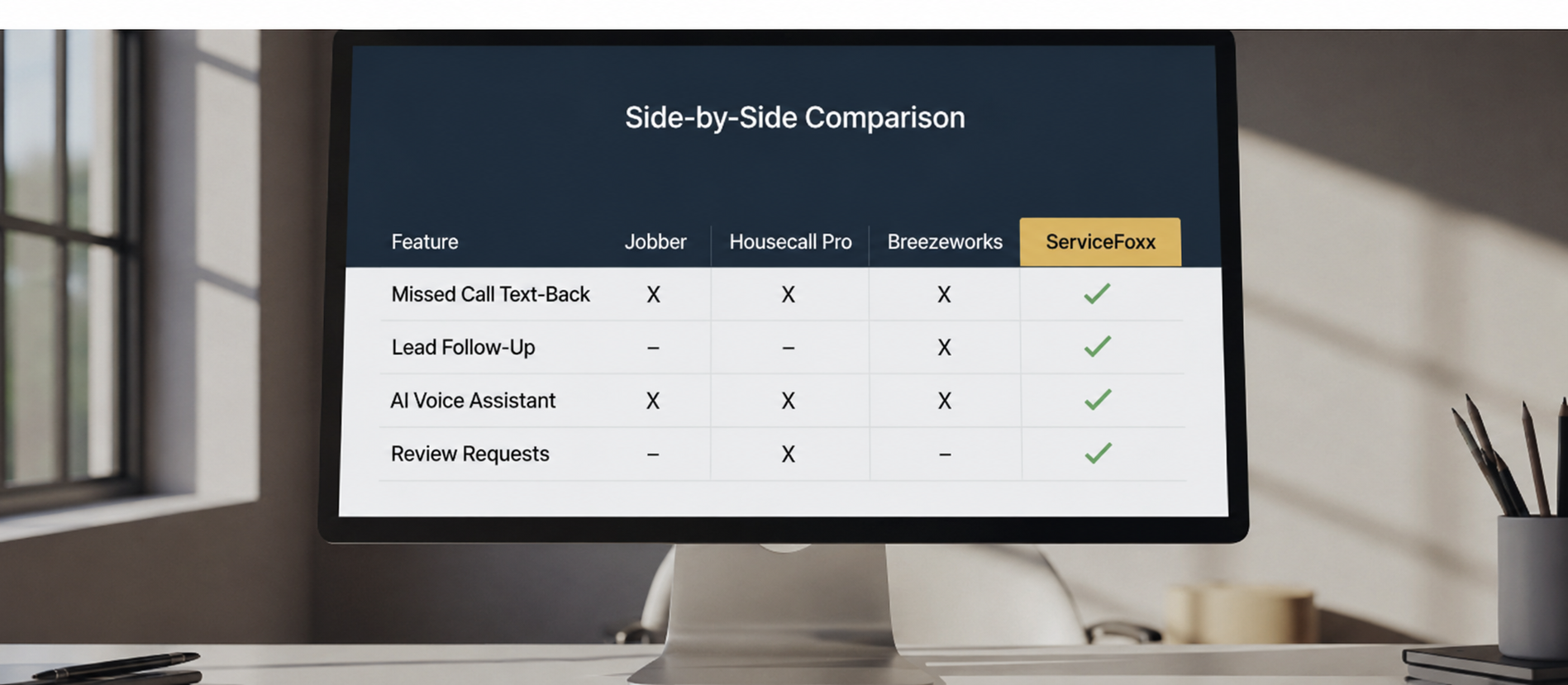
Side-by-Side Comparison
| Feature | Jobber | Housecall Pro | Breezeworks | ServiceFoxx |
|---|---|---|---|---|
| Starting price | ~$39/mo | ~$59/mo | ~$30/mo | $450 a month |
| Free trial | Yes | Yes | 14 days | Demo |
| Scheduling & dispatch | Strong | Advanced | Basic | Via integration |
| Invoicing & payments | Yes | Yes | Yes | Yes |
| Mobile app | 4.8 stars | 4.6 stars | Yes | Yes |
| QuickBooks integration | Yes | Yes | Online only | Yes |
| Jobber integration | — | — | — | Yes |
| Housecall Pro integration | — | — | — | Yes |
| Missed call text-back | No | No | No | Yes - Instant |
| Lead follow-up sequences | Limited | Limited | No | Yes - Automated |
| AI voice assistant | No | No | No | Add-on ($150/mo) |
| AI conversation bot | No | No | No | Included |
| Database reactivation | No | Limited | No | Yes |
| Review requests | Basic | Yes | Basic | Yes - Automated |
| Done-for-you setup | No | No | No | Yes - Included |
| Contract required | Annual opt. | Annual opt. | No | No |
The Gap None of Them Fill
Here's what's missing from all three platforms — and it's the most expensive gap in a home service contractor's tech stack:
None of them respond to missed calls.
When a homeowner calls your business during a job, in a crawl space, or at 9pm and doesn't reach you, Jobber doesn't send a text. Housecall Pro doesn't follow up. Breezeworks doesn't respond. The lead calls the next contractor on their list, and you never know you lost a job that was yours to win.
The data on lead response is consistent: the majority of service jobs go to the first business that responds. For HVAC contractors during peak season, roofing companies after storms, and cleaning businesses competing on first impression, response time is the single biggest revenue variable — and none of the three platforms above address it.
The same gap exists in estimate follow-up. Jobber tracks open quotes. Housecall Pro shows pending estimates. Breezeworks logs them. But none automatically follow up at 24 hours, 72 hours, and 7 days to keep estimates alive. That follow-up is where most unconverted estimates could have closed.
Where ServiceFoxx Fits In
ServiceFoxx isn't a replacement for Jobber, Housecall Pro, or Breezeworks — it's the automation layer those platforms don't have. ServiceFoxx integrates with both Jobber and Housecall Pro, so contractors keep the job management software they already know while adding the CRM automation and lead response system those platforms are missing.
What ServiceFoxx adds on top of any field service platform:
- Missed call text-back — fires within seconds of every missed call, any hour of day or night
- Estimate follow-up sequences — automated at 24hrs, 72hrs, and 7 days until the quote closes
- Lead pipeline and CRM — full visibility on every inbound lead from first contact to booked job
- Post-job review requests — automatic after every completed job
- Database reactivation — re-engages past customers who haven't booked in months
- AI voice receptionist — optional add-on at $150 a month, answers calls 24/7, qualifies leads, and books appointments without human involvement
The most common setup: A roofing contractor uses Jobber for scheduling, dispatch, and invoicing. They use ServiceFoxx for missed call response, estimate follow-up, review requests, and lead nurturing. The two systems handle different parts of the business — and both work better together than either one alone.
Frequently Asked Questions
Which is better — Jobber or Housecall Pro?
For solo operators and small teams who want simplicity, Jobber is generally easier to adopt and more affordable at entry level. For growing businesses with multiple technicians, Housecall Pro's team management and dispatching features often justify the higher cost. Both have a learning curve and neither handles inbound lead automation.
Is Breezeworks a good alternative to Jobber?
Breezeworks is a solid choice for solo operators who find Jobber's pricing too high. It covers scheduling, invoicing, and basic customer communication at a lower monthly cost. For businesses with a team or more complex workflow needs, Jobber or Housecall Pro will offer more depth.
Does ServiceFoxx replace Jobber or Housecall Pro?
No — ServiceFoxx integrates with both. Most contractors use their existing field service software for job management and add ServiceFoxx for CRM automation, missed call response, lead follow-up, and review requests those platforms don't provide.
What's the biggest mistake contractors make when choosing field service software?
Focusing entirely on job management features without considering what happens to leads before they become jobs. A contractor can have perfect scheduling software and still lose 30-40% of inbound leads to slow response times and missed follow-ups. That revenue gap is what ServiceFoxx is built to close.
Can I use ServiceFoxx without Jobber or Housecall Pro?
Yes. ServiceFoxx includes proposals, invoicing, and a full CRM pipeline, so it can function as a standalone system for contractors who don't need the full depth of Jobber or Housecall Pro's job management features.
Add the automation layer your field service software is missing
ServiceFoxx works alongside Jobber, Housecall Pro, and Breezeworks — adding missed call response, estimate follow-up, review requests, and a full lead pipeline. Done for you. Your website is live in month one, your CRM is running by month two once the phone carriers approve texting. Starting at $450 a month. Three month minimum, then month to month, cancel any time after that.
Book Your Free DemoAbout the Author
ServiceFoxx Team
Co-founder of Service Foxx and expert in contractor operations. Dedicated to helping home service businesses scale through high-ticket automation systems that actually work.
Master Your Trade
Continue Learning

Landscaping Business Software: How Lawn Care and Landscaping Companies Automate Follow-Up and Fill Their Schedule
CRM for Cleaning Companies: How to Automate Bookings, Follow-Up, and Reviews