Jobber vs. Service Foxx: Do You Need Both? (An Honest Breakdown)
Written by
Kylee Robinson
Quick Executive Summary
Jobber runs your jobs. Service Foxx runs your leads. They solve different problems.
Most contractors running both see a 20-35% lift in closed work from better follow-up.
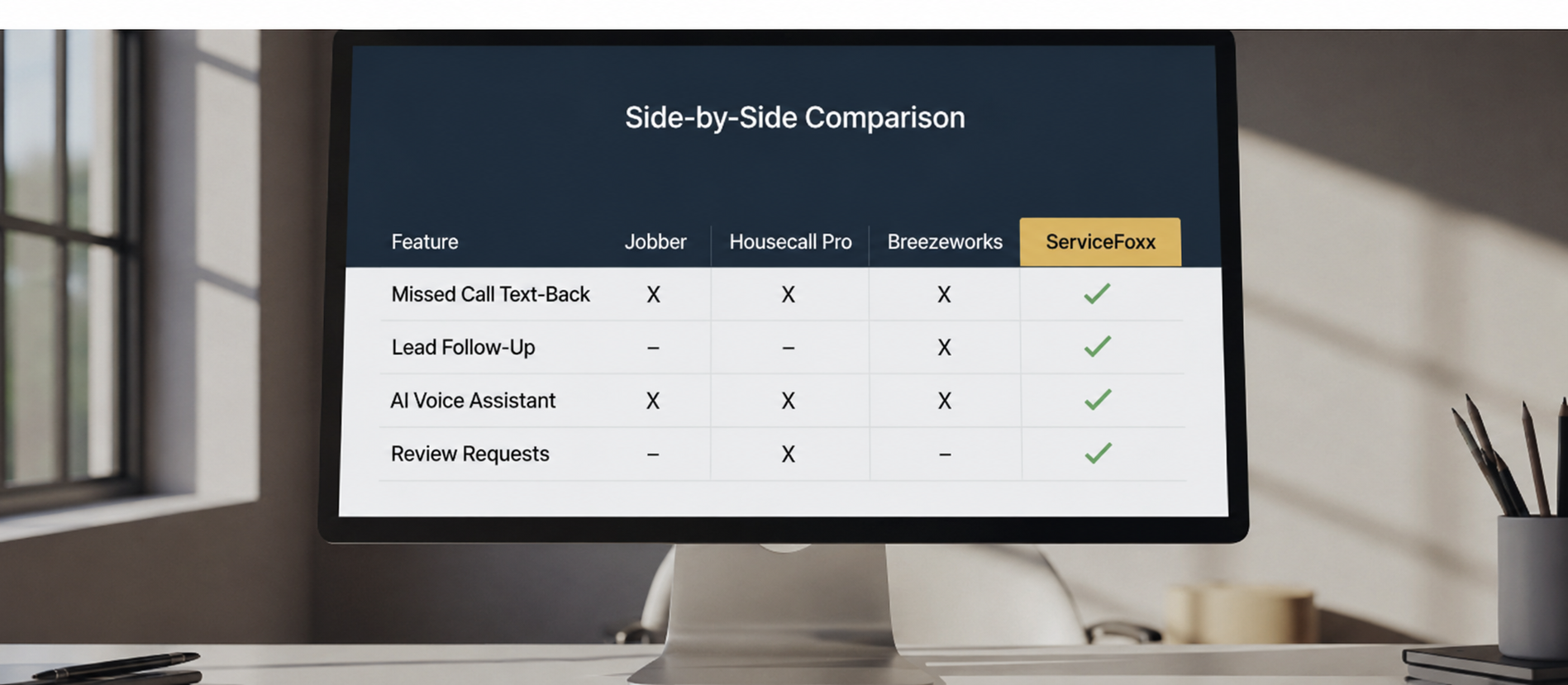
Service Foxx adds missed call text-back, estimate follow-up, and review requests Jobber doesn't do.
Running both typically costs $200-$400/month total. Most clients recover that in one saved job.
Short answer: Yes — and they're not competitors. Jobber runs your jobs. Service Foxx runs your lead communication and follow-up. Most contractors running both see a 20–35% lift in closed work because they finally stop losing jobs between the inquiry and the estimate. Here's the honest breakdown of what each one actually does.
I'm Kylee. I co-founded Service Foxx with Sami. My husband Dwayne runs Appalachian Exteriors in Pennsylvania, and we built the original system for his business before we ever sold it to another contractor. At the time, he was using Jobber. He still does. Service Foxx doesn't replace it — it plugs the hole Jobber was never built to plug.
This post is for the contractor who's already paying for Jobber, wondering if adding anything else is worth it. Straight answer coming.
What Jobber does well
Jobber is excellent at job management. That's what it was built for.
- Scheduling crews and vehicles
- Dispatching jobs to techs in the field
- Invoicing and payment collection
- Client job history
- Basic quoting
- Route optimization
If you have jobs to run, Jobber runs them. No complaints.
What Jobber isn't built to do
Jobber's weak spot — and this isn't a knock, it's just outside its design — is everything that happens before a job becomes a job. The entire lead communication layer.
Specifically:
- Instantly texting back a missed call
- Automatically following up on estimates that go quiet
- Qualifying leads before they hit your calendar
- 24/7 AI phone answering for after-hours calls
- Database reactivation of past customers during slow months
- Consistent review requests the moment a job closes
- Reputation management across Google reviews
Jobber has light versions of some of this. Basic email follow-up exists. Review requests exist. But they're built as add-ons to the core job management engine — not as a full communication system configured specifically for contractors.
That's the gap Service Foxx fills.
The numbers that show the gap
Industry research puts inbound call conversion at 30–50% for contractors who actually answer — we use 35% as the conservative number. If you miss the call, conversion drops to roughly 5–10%. Most contractors miss 3–8 calls a week.
A contractor missing 5 calls a week at a $1,200 average job value is losing roughly $11,000 a month in revenue that Jobber alone can't save. Jobber doesn't text back missed calls. It doesn't answer the phone at 2 AM. It doesn't chase the estimate you sent three days ago.
Service Foxx does all of that.
What running both actually looks like
Here's the handoff I configure in every Service Foxx account for a Jobber user:
1. Lead comes in (phone, web form, Facebook, Google ad, anywhere).
Service Foxx catches it. If it's a missed call, text fires back in under 60 seconds. If it's a form, the lead gets auto-confirmation and your phone gets a notification.
2. Qualification and booking.
Service Foxx either books the lead directly into your calendar through its booking link, or Conversation AI (included at no extra cost) handles the text replies automatically. Want your phone actually answered by AI voice? Add the AI voice receptionist any time for $150 a month.
3. Estimate goes out.
You build the quote in Jobber (or Service Foxx — your call). The moment it's marked "sent," the Service Foxx follow-up sequence kicks off. Five-touch sequence over 14 days. We handle the ghost estimate problem.
4. Job is signed.
At sign, the contact pushes into your Jobber job pipeline. Jobber takes over for scheduling, dispatching, invoicing, and payment collection. That's its lane.
5. Job completes.
Jobber marks it done. Service Foxx listens for that status and fires the review collection sequence (1-10 gut check → Google review link → follow-up). Reviews pile up without you asking anyone.
6. Ongoing.
Service Foxx keeps that customer in the database and triggers reactivation campaigns during slow months. Jobber doesn't do this well. We do.
The two tools never fight. They run alongside.
Why you can't just use one
If you try to do everything in Jobber, you'll have decent job management and weak lead communication.
If you try to do everything in Service Foxx, you'll have strong lead communication, CRM, and automation — but you'll be rebuilding the scheduling and dispatch engine Jobber already does better.
Running both gives you each tool doing what it's best at.
The cost question
- Jobber plans: $49–$279/month depending on tier
- Service Foxx: $450 a month, no setup fee, everything included
So at the low end, adding Service Foxx to your Jobber plan costs an extra $450 a month. Our typical roofing and HVAC clients are recovering 2–4 jobs a month they were losing to slow follow-up alone. At a $1,500 average job value, that's $3,000–$6,000/month in recovered revenue.
$450 in, $3,000+ back. That's the math.
What "integration" actually means
A fair question: do the tools actually talk to each other?
Not through a native integration, but with Zapier or a Make.com automation, we wire up the critical triggers — new Jobber client syncs to Service Foxx, job status changes fire Service Foxx workflows. For most clients the "integration" we actually need is just the shared phone number and a clean pipeline handoff.
If a custom Zapier workflow is part of your setup need, that's a one-time $100 add-on. Most contractors don't need it — they use Service Foxx for the front-end lead pipeline and Jobber for the back-end job execution, and the two never have to share data.
Who doesn't need both
Being honest here — not every contractor needs both tools.
You probably only need Service Foxx if:
- You're not using a job management tool yet and you have under 10 employees
- Your biggest pain is losing leads, not running jobs
- You want one system instead of two
You probably only need Jobber if:
- Your lead flow is already tight and your follow-up is consistent
- You're not losing estimates or missing calls
- You have a dedicated office person managing all lead communication
If you're missing calls, losing estimates, or not getting reviews — you need the communication layer. That's us.
The bigger pattern
The best-run contractor businesses I've seen aren't the ones using one monster tool. They're the ones using 2–3 focused tools that each do one thing well, with clean handoffs between them. Jobber for jobs. Service Foxx for communication. Maybe QuickBooks for accounting. That's usually the full stack.
What you don't want is 8 disconnected tools held together with duct tape and prayers. Which is what most contractors have.
Next steps
If you're already on Jobber and want to see exactly how Service Foxx plugs into your setup, book a demo — I walk through the handoffs live. 15 minutes.
If you want to see the math on what your current follow-up gaps are costing you, run your numbers through the revenue calculator.
If you're ready to get started, here's the form. Your website is live in about a month and your CRM is running by month two once the phone carriers approve texting.
. Kylee
Frequently Asked Questions
Do I need to cancel Jobber if I get Service Foxx?
No. They're complementary. Jobber runs your jobs, scheduling, and invoicing. Service Foxx runs your lead communication, follow-up, and reviews. Most of our clients keep both.
Does Service Foxx integrate directly with Jobber?
Not through a native integration, but we can connect the critical triggers through Zapier or Make.com if needed. Most clients don't need deep integration — Service Foxx handles pre-job communication, Jobber handles job execution, and the pipeline stages keep them in sync.
What does Service Foxx do that Jobber doesn't?
Missed call text-back in under 60 seconds, 5-touch estimate follow-up sequences, automatic Google review requests with satisfaction gating, database reactivation campaigns for past customers, and full SMS/email conversation handling with A2P carrier registration. Conversation AI and Reviews AI are included at no extra cost. AI voice phone answering is an optional add-on at $150 a month.
Is Service Foxx cheaper than Jobber?
Service Foxx is $450 a month, no setup fee. Jobber ranges from $49–$279/mo. They're priced in the same range but solve different problems. Running both typically costs $200–$400/mo total.
What's the setup process if I already use Jobber?
Fill out the Service Foxx setup form (3 minutes). We configure your account in month one, your CRM is running by month two once the phone carriers approve texting (including A2P carrier registration, all automation copy, workflow builds, and calendar setup). Personal walkthrough video when it's ready. You keep using Jobber for job management exactly as you do today.
About the Author
Kylee Robinson
Co-founder of Service Foxx and expert in contractor operations. Dedicated to helping home service businesses scale through high-ticket automation systems that actually work.
Master Your Trade
Continue Learning

Landscaping Business Software: How Lawn Care and Landscaping Companies Automate Follow-Up and Fill Their Schedule
Jobber vs Housecall Pro vs Breezeworks: Which Field Service Software Is Right for Your Contractor Business?